Security at Shellway
How we protect your computer and your data · Last reviewed 27 November 2026
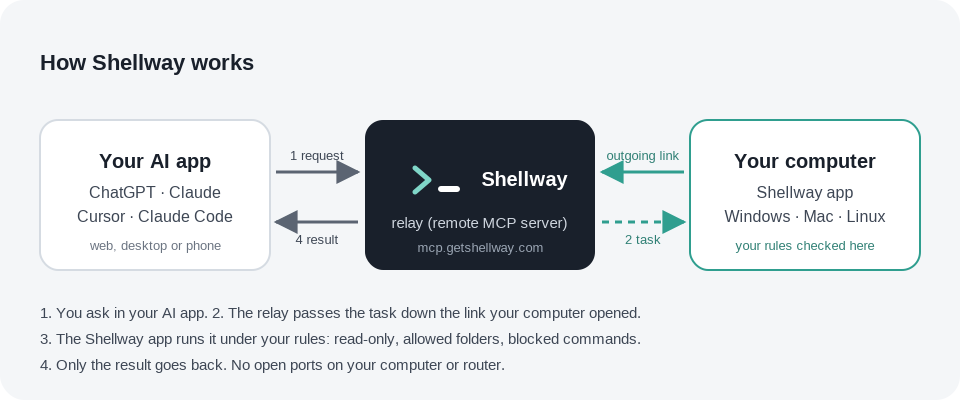
Shellway lets an AI app run commands and work with files on your own computer. That is powerful, so this page explains plainly how it works, what we can and cannot see, and what you control.
How the connection works
- Outgoing only. The Shellway app on your computer opens an outgoing, encrypted connection (HTTPS / secure WebSocket, TLS) to our relay. No port is opened on your computer or router, and nothing on your computer is reachable from the internet.
- Pairing. A computer joins your account with a one-time pairing code made from a cryptographic random source. Each paired computer gets its own secret key; we store only a hash of it, not the key itself.
- Your AI app signs in with OAuth. ChatGPT, Claude and other apps connect with standard OAuth to your Shellway account; they never get your password.
What the relay can and cannot see
- A request from your AI app (for example a command or a file path) passes through the relay to your computer, and the answer passes back. We do not store command output or file contents.
- We keep an action log for your account: the time, the computer, the tool that was used and whether it worked. You see it in your dashboard; it is kept for 90 days.
- Details are in the privacy policy.
Rules that stay on your computer
You set these on the computer itself with shellway policy. The AI cannot change them, and the Shellway app refuses to touch its own settings folder when asked through the AI.
- Read-only mode: the AI can look but not change anything.
- Allowed folders: file tools (read, write, edit, search) work only inside the folders you list, and commands start there. A command can still reach other folders, so for a strict limit also turn commands off (
shellway policy commands off) or use read-only mode. - Blocked commands: for example delete, format or shutdown commands.
- Backups before edits and a log of every action.
See safety rules for AI on your computer and a read-only first week for step-by-step setups.
What Shellway does not have yet
We would rather tell you the limits plainly:
- No independent security audit yet. The design is described on this page; it has not been reviewed by an outside firm.
- Folder limits cover file tools, not every command. See allowed folders above; turn commands off or use read-only mode for a strict limit.
- Shellway does not ask you before each command. Your AI app may ask you to approve actions; on the computer you can use read-only mode, blocked commands and
shellway policy block-deletes. - Not open source. The agent's code can be read in the npm package, but it is not under an open-source licence, and the relay is closed. The plugin files on GitHub are MIT licensed.
Prompt injection: read this
An AI app can be tricked by text it reads, for example instructions hidden in a web page, an email or a file. If the AI then has access to your computer, it might try to act on them. Shellway cannot tell a good request from a tricked one, so:
- Start in read-only mode, and allow only the folders the AI needs.
- Keep the AI away from untrusted files and pages while it can run commands, and read what it plans to do before you approve it in your AI app.
- Check the action log in your dashboard if something looks wrong.
Turning access off
- Stop at once: stop or uninstall the Shellway app on the computer.
- Remove a computer: remove it in your dashboard; its key stops working immediately.
- Remove an AI app: disconnect Shellway in ChatGPT, Claude or your other app.
- Delete everything: see data deletion.
Reporting a security problem
Please email support@getshellway.com with "Security" in the subject. The founder reads every message and replies within 2 working days. Please give us a reasonable time to fix a problem before you publish it. Machine-readable contact details: security.txt.